
Zebra ZT610 vs. ZT620: Same Platform, Different Print Width. Which One Is Right for Your Labels?
Posted by Thermal Printer Supplies on Sep 29th 2026
By Thermal Printer Supplies | Industrial Printers | ZT610 vs. ZT620 Decision Guide
In our Top 5 Industrial Printers 2026 guide, the ZT610/ZT620 series ranked first as the undisputed market leader in industrial barcode printing. If you've read that guide and landed here trying to figure out whether you need the ZT610 or the ZT620, this is the page that answers it.
The Primary Decision: What Width Label Are You Printing?
Why does print width drive the ZT610 vs ZT620 decision?
The ZT610 prints labels up to 4 inches wide. The ZT620 prints labels up to 6 inches wide. If your label is 4 inches wide or narrower, either printer handles it. If your label is wider than 4 inches, you need the ZT620. That's the most straightforward version of the decision.
In practice, 4-inch is the most common label width in warehousing and distribution. Standard 4x6 shipping labels, 4x3 product labels, 4x2 inventory tags, and most common barcode label formats fall within the ZT610's 4-inch print width. The vast majority of industrial labeling operations run labels that fit comfortably within 4 inches.
Where 6-inch print width becomes necessary is for wider labels that don't fit in a 4-inch print path: packing list and container labels that need a wider format, case labels for larger packaging formats, compliance labels with requirements for a wider print area, and some industrial asset tags and outdoor signage that use wider stock. If your operation currently buys 5-inch or 6-inch label stock, the ZT620 is the right printer.
Does the ZT620's 6-inch capability mean it can also print 4-inch labels?
Yes. The ZT620 can print labels of any width up to 6 inches, including standard 4-inch labels. Some operations buy the ZT620 for flexibility even when their current label is 4 inches wide, reasoning that if their label format changes in the future they won't need to replace the printer. That logic is reasonable but comes with two trade-offs. The ZT620 has a slightly lower maximum print speed than the ZT610 at 12 ips versus 14 ips, and it doesn't offer the 600 DPI printhead option the ZT610 does. If 600 DPI is a current or future requirement, the ZT610 is the right choice regardless of the label width situation.
The Two ZT610-Specific Advantages
600 DPI: only available on the ZT610
The ZT610 is available in 203 DPI, 300 DPI, and 600 DPI configurations. The ZT620 tops out at 300 DPI. If your application requires 600 DPI, the ZT610 is your only option in the ZT600 series.
600 DPI is the right choice for applications printing very small labels, high-density 2D barcodes like Data Matrix codes at very small module sizes, or fine text at small point sizes where 300 DPI produces edges that aren't sharp enough for reliable scanning. Electronics component labeling, pharmaceutical unit dose labels, serialized medical device labels, and small-format compliance labels are the most common 600 DPI use cases. For most standard warehouse and distribution labeling at 203 or 300 DPI, both the ZT610 and ZT620 produce equivalent print quality.
RFID encoding: available on both, but the ZT610 offers tighter inlay pitch
Both the ZT610 and ZT620 offer RFID encoding configurations. The ZT610 RFID specifically supports high-density RFID inlays with spacing as small as 0.6 inches, which allows more labels per roll and reduces media cost per encoded label. For operations running RFID compliance programs where label cost per unit is a meaningful operational expense, the ZT610's support for tighter inlay pitch is a real cost efficiency advantage.
The ZT610 RFID also uses Adaptive Encoding Technology that automatically optimizes encoding performance for different inlay types without manual configuration adjustment. For operations encoding multiple RFID inlay types or running high-volume RFID encoding lines, the adaptive encoding reduces the setup overhead of switching between inlay types.
What They Share
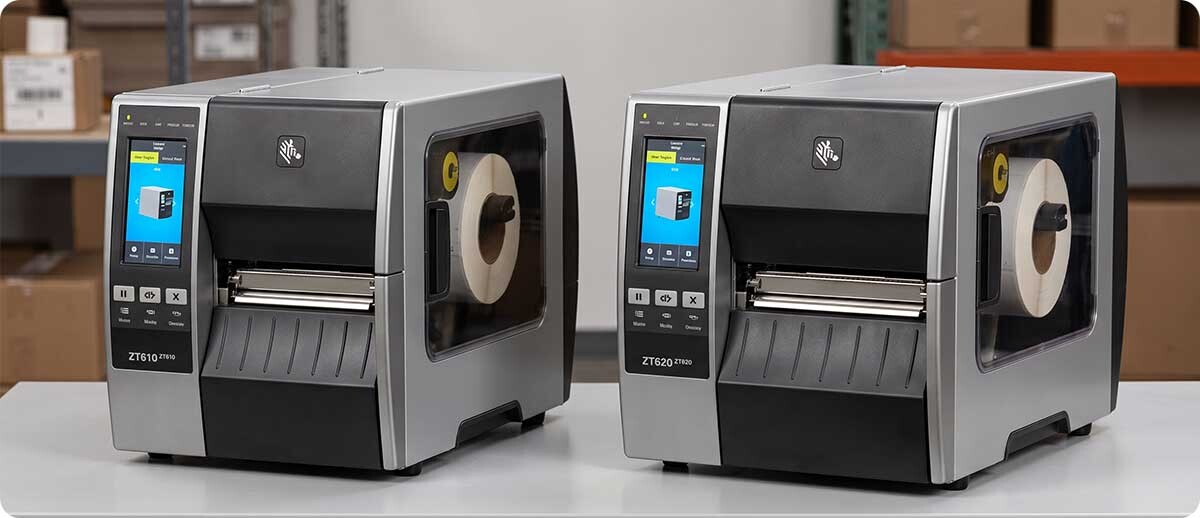
Everything else about the ZT610 and ZT620 is the same. Both have an all-metal frame with bi-fold door built for 24/7 industrial use. Both run Zebra's Link-OS platform with the same management tools, the same ZPL II native language, and the same connectivity: Serial, USB, Gigabit Ethernet, Bluetooth 4.0, USB Host, and optional Wi-Fi. Both have a color touch display for status and configuration. Both offer the same finishing options including tear bar, cutter, rewind, and peeler configurations. Both carry the same Zebra ZT600 series warranty and support structure.
If your operation already runs one ZT600 series printer, adding the other model is straightforward. Your management infrastructure, ZPL templates, and operator familiarity with the platform all carry over regardless of which model you add.
The Quick Comparison
| Spec | ZT610 | ZT620 |
|---|---|---|
| Print width | 4 inches | 6 inches |
| Max print speed | 14 ips | 12 ips |
| DPI options | 203, 300, 600 | 203, 300 |
| RFID option | Yes (high-density, 0.6" pitch) | Yes (standard) |
| Frame | All-metal, bi-fold door | All-metal, bi-fold door |
| Display | Color touch | Color touch |
| Connectivity | Serial, USB, GigE, BT, optional Wi-Fi | Serial, USB, GigE, BT, optional Wi-Fi |
| Best for | Standard 4-inch labels, 600 DPI, RFID high-density | Labels wider than 4 inches |
Shop ZT610 and ZT620 at TPS
Zebra ZT610 (4-inch)
4-inch | Up to 14 ips | 203, 300, or 600 DPI | RFID option | Tear, cutter, rewind, peeler options | Color touch display
ZT61042-T010100Z: 203 DPI, tear
ZT61043-T010100Z: 300 DPI, tear
ZT61043-T210100Z: 300 DPI, rewind
ZT61042-T110100Z: 203 DPI, cutter
ZT61043-T0102A0Z: 300 DPI, RFID UHF encoder
Shop Zebra ZT610 →Zebra ZT620 (6-inch)
6-inch | Up to 12 ips | 203 or 300 DPI | RFID option | Tear, cutter, rewind, peeler options | Color touch display
ZT62063-T010100Z: 300 DPI, tear, Gigabit Ethernet, Bluetooth 4.0
Shop Zebra ZT620 →Quick Questions
We're replacing Xi4 series printers. Which ZT600 is the right migration?
Match the print width. If you're replacing a 110Xi4 (4-inch), the ZT610 is the direct successor. If you're replacing a 140Xi4 (6-inch), the ZT620 is the right migration. Both ZT600 series printers inherit the Xi legacy and improve on it with Link-OS management, color touch display, and better connectivity. Your existing ZPL templates carry over without modification. The physical media path dimensions are comparable so most media that ran in the Xi4 will load correctly in the ZT600 equivalent.
Can we use the same media in both the ZT610 and ZT620?
If the media is 4 inches wide or narrower, yes. Both printers accept the same standard 3-inch core industrial media rolls. If you're standardizing media across a mixed ZT610 and ZT620 fleet, keep your 4-inch labels universal and use 5 or 6-inch media only for the specific applications that require it on the ZT620.
Is the 600 DPI printhead worth the premium over 300 DPI for pharmaceutical or electronics labeling?
For unit dose pharmaceutical labels and electronics component labels where the barcode and human-readable text need to be very small and very sharp, yes. 600 DPI produces noticeably crisper edges on small barcode modules and fine text than 300 DPI, which matters when scan reliability at small scale is a quality requirement rather than just a preference. For standard warehouse labels at typical sizes, 300 DPI is more than sufficient and the 600 DPI premium adds cost without adding operational value.
If you want a straight recommendation on which ZT600 configuration fits your specific label size, DPI, and finishing requirements before you order, fill out the form below. We can confirm the right model and SKU quickly once we know what you're printing.