
Core Size Matters: 0.5-Inch vs. 1-Inch vs. 3-Inch Cores and Why Getting It Wrong Jams Your Printer
Posted by Thermal Printer Supplies on Oct 12th 2026

By Thermal Printer Supplies | Labels & Ribbons | Label Core Sizes Explained
This post covers what core sizes are, which sizes correspond to which printer types, what happens when the core size is wrong, and how to confirm the right spec before you order.
What Is a Label Core & Why Does the Size Matter?
What exactly is the core and what does it do?
The core is the hollow cardboard or plastic tube that label rolls and ribbon rolls are wound around. Every thermal printer has a spindle or hub inside the media compartment that the core slides onto to hold the roll in place and allow it to unwind smoothly during printing. The core size refers to the inner diameter of that tube, which must match the spindle diameter in your specific printer.
Core size is separate from roll outer diameter (how big the full roll is) and label width. You can have two rolls of identical label stock in the same dimensions with different core sizes. Both look similar on a shelf but only one will fit your printer correctly. This is where ordering errors happen most often, especially when purchasing from a new supplier or ordering a new label size for the first time.
What are the standard core sizes used in thermal printing?
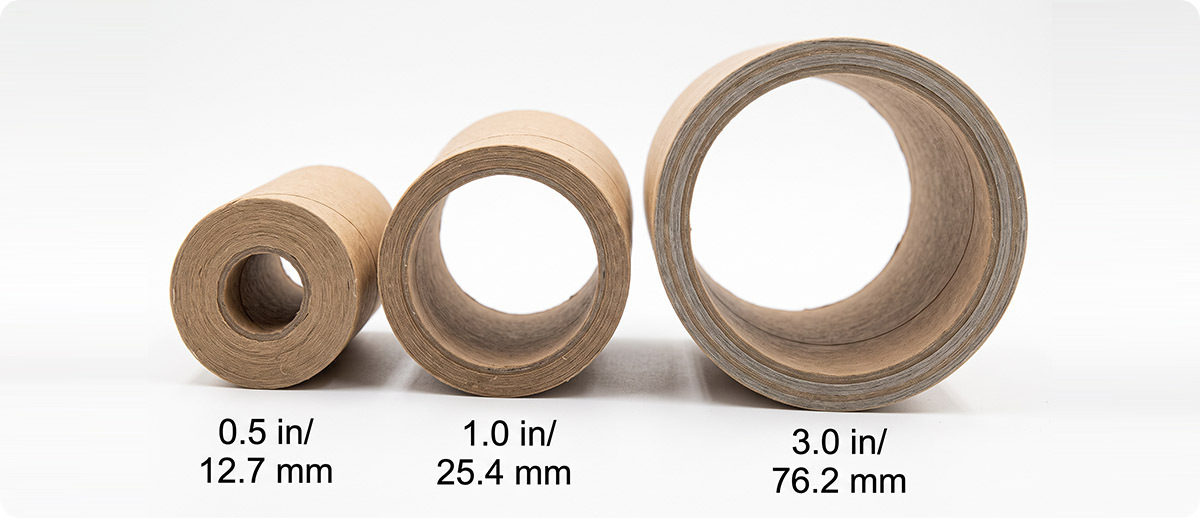
Three core sizes cover the vast majority of thermal label and ribbon applications:
0.5-Inch Core (12.7 mm)
The smallest standard core size. Used almost exclusively in desktop thermal printers, particularly compact and entry-level models designed for lower-volume environments. If you're running a small label printer on a shipping desk or a retail counter, your rolls likely have a 0.5-inch core. These rolls hold fewer labels than the same label on a larger core simply because the smaller core leaves less room for media on the roll.
1-Inch Core (25.4 mm)
The most common core size across both desktop and industrial thermal printers. Most mid-range desktop printers from Zebra, Honeywell, and TSC accept 1-inch core rolls, and most industrial printers accept 1-inch as their standard or minimum core size. When a product listing doesn't specify core size, 1-inch is the most likely default, but that assumption has caused enough ordering errors that it's worth confirming rather than assuming. Ribbons in most mid-range printers also use a 1-inch core.
3-Inch Core (76.2 mm)
The largest standard core size, used in industrial and high-volume thermal printers designed for demanding production environments. A 3-inch core roll holds significantly more labels than the same label on a 1-inch core because the larger core allows more media to be wound at a larger diameter. Industrial printers from Zebra's ZT-series and similar industrial platforms typically accept or require 3-inch cores. Some industrial printers accommodate both 1-inch and 3-inch cores with an included adapter; others are designed specifically for one or the other.
Core Size by Printer Type
Which core size does my printer use?
Core size requirements vary by printer model. The most reliable way to confirm your printer's required core size is to check the printer's specification sheet or media guide. As a general reference:
| Printer Category | Typical Core Size | Examples |
|---|---|---|
| Compact desktop | 0.5-inch | Zebra ZD220, ZD230, entry-level desktop models |
| Mid-range desktop | 1-inch | Zebra ZD421, ZD621, Honeywell PC45, TSC TE310 |
| Entry industrial | 1-inch or 3-inch (with adapter) | Zebra ZT231, ZT411, Honeywell PM45 |
| High-volume industrial | 3-inch | Zebra ZT610, ZT620, ZT510, high-duty-cycle platforms |
| Mobile printers | 0.5-inch (varies by model) | Zebra ZQ521, ZQ630 Plus, Honeywell RP4 |
These are general guidelines. Specific models within each category can differ, and some printers ship with a core adapter that allows multiple core sizes. Always confirm against your printer's spec sheet rather than relying on category assumptions alone.

What Happens When the Core Size Is Wrong
What actually goes wrong if I load the wrong core size?
Core too small for the spindle. If the core's inner diameter is smaller than the spindle it needs to slide onto, the roll simply won't seat. This is immediately obvious and produces no damage, just the inconvenience of discovering the error when you're trying to reload during a shift. The roll goes back in the box and you're waiting on the right supply.
Core too large for the spindle. If the core's inner diameter is larger than the spindle, the roll will seat but will wobble during unwinding. A wobbly roll causes inconsistent media tension, which produces label tracking errors, registration problems where the label position shifts relative to the print area, and in some cases media jams. The printer may run for a while before the issue becomes obvious, which means the problem gets diagnosed as a printer fault rather than a media fault and wastes troubleshooting time.
Ribbon core mismatch. Ribbon core errors cause similar issues. A ribbon roll that doesn't seat correctly on the ribbon spindle produces ribbon wrinkle, uneven ink transfer, and ribbon breaks. These are among the most frustrating print quality issues to diagnose because they look like printhead or darkness setting problems rather than the supply error they actually are. If you've recently switched ribbon suppliers and suddenly have ribbon wrinkle issues, core size is the first thing to check.
How to Confirm the Right Core Size Before You Order
How do I find out exactly what core size my printer needs?
Three reliable methods, in order of confidence:
1. Measure your current roll. If you have a roll that you know works in your printer, measure the inner diameter of the cardboard tube with a ruler or calipers. That measurement is your core size. Half an inch, one inch, and three inches are the common results. If the measurement falls between those numbers, double-check with calipers since cardboard cores compress slightly.
2. Check your printer's spec sheet. Every printer manufacturer publishes a spec sheet that includes media specifications, which will list the acceptable core sizes. The Zebra spec sheets list it under "Media Specifications" or "Roll Specifications." If you don't have the spec sheet, the printer's model number on a sticker inside the media compartment will get you there with a quick search.
3. Check the product listing carefully. Core size should be listed in the product specifications for any label or ribbon. At Thermal Printer Supplies, core size is listed in the product specs so you can confirm before adding to cart. If the listing you're looking at doesn't clearly state core size, contact us before ordering rather than assuming.
Quick Questions
My printer says it accepts both 1-inch and 3-inch cores. Does it come with an adapter?
Most industrial printers that support both core sizes ship with a core adapter in the box. The adapter slides onto the spindle to reduce it from the 3-inch native size down to 1-inch, so you can run either core size depending on what media you load. Check inside your printer's media compartment or in the accessories that shipped with it. If the adapter is missing or has been lost, replacement core adapters are available for most Zebra and Honeywell industrial printer models. Contact us with your printer model and we can source the right adapter.
Does core size affect how many labels I get per roll?
Yes, indirectly. The core takes up space at the center of the roll. A larger core means more of the roll's diameter is consumed by the core itself, leaving less room for media at any given outer roll diameter. However, industrial printers designed for 3-inch cores also typically accommodate larger outer roll diameters than desktop printers, so the net result is that industrial rolls hold more labels overall despite the larger core. The core size alone doesn't tell you how many labels are on a roll — you need both the outer roll diameter and the core size to calculate roll capacity, along with the label pitch.
Can I use a desktop label roll in an industrial printer with an adapter?
Technically yes if the core adapter reduces the spindle to fit the smaller core, but practically it's not a great idea for ongoing use. Desktop rolls have a smaller outer diameter than industrial rolls, which means more frequent roll changes on a printer designed for longer run cycles. It also means you're not using the printer's full media capacity, which defeats part of the purpose of having an industrial printer. Desktop rolls in an industrial printer work fine for a one-off situation but aren't the right ongoing supply choice for a high-volume environment.
If you're not sure which core size your printer or ribbon requires, the easiest path is to grab your printer's model number and reach out before ordering. We'd rather take two minutes to confirm the right spec than have you deal with a roll that doesn't seat on shift change. Browse labels and ribbons by printer at Thermal Printer Supplies or contact us directly and we'll confirm the right spec for your setup.