
Static Electricity in the Warehouse: Why Your Printer is Freezing or Misprinting
Posted by Thermal Printer Supplies on Mar 23rd 2026

By Thermal Printer Supplies | Printer Troubleshooting | Warehouse Maintenance Guide
Static electricity doesn't announce itself. There's no warning light, no error message that says "electrostatic discharge detected." Instead, it disguises itself as a dozen other problems — random freezes, communication dropouts, corrupted print jobs, smeared barcodes, and premature printhead failures that seem to come out of nowhere.
In warehouses, distribution centers, and manufacturing floors — exactly the environments where thermal printers work hardest — the conditions that generate static electricity are almost unavoidable. Understanding what creates it, what it does to your printer, and how to eliminate it can save you thousands of dollars in service calls, replacement hardware, and downtime.
This guide covers the complete picture: the physics of static in a warehouse, every symptom it causes, and a practical step-by-step elimination process — with the cleaning products that support it.
Why Warehouses Are Static Electricity Hotspots
Static electricity builds up when two materials rub together and electrons transfer from one surface to another — a process called triboelectric charging. In a warehouse, this is happening constantly and everywhere:
- Label liner moving through the printer — as the label backing paper peels away from the adhesive facestock at high speed, it generates significant electrostatic charge. This charge transfers directly into the printer mechanism and can arc into sensitive electronics.
- Thermal ribbon unwinding — the friction between ribbon layers as the supply roll unwinds and the take-up roll winds is a consistent source of static generation inside the printer enclosure.
- Forklift and pallet jack traffic — rubber tires rolling across concrete and vinyl flooring generate continuous static charge that builds in the surrounding environment.
- Worker movement — shoes on vinyl or concrete flooring build charge on workers' bodies. When a charged worker touches or approaches the printer, they can discharge directly into its electronics.
- Low humidity — dry air is a poor conductor, meaning charges that build up have nowhere to go. Heated warehouses in winter and air-conditioned facilities in summer both tend toward low relative humidity — the ideal conditions for static accumulation.
- Synthetic packaging materials — polyethylene stretch wrap, polypropylene bags, and foam packaging are among the most electrically active materials in the triboelectric series. Moving them near printers contributes directly to the ambient static field.
The result is an environment where your thermal printer is constantly exposed to electrostatic discharge (ESD) events — some dramatic enough to cause immediate failure, most subtle enough to accumulate damage over time or interfere with normal operation intermittently.
How Static Electricity Damages and Disrupts Thermal Printers
Static electricity affects thermal printers through two distinct mechanisms: electrostatic discharge (ESD) events that cause immediate damage or disruption, and electrostatic attraction (ESA) that causes contamination buildup over time. Both matter, and both produce symptoms that are easy to misdiagnose.
Electrostatic Discharge (ESD): The Sudden Strike
An ESD event occurs when a charged object — a worker's hand, a charged label liner, a piece of packaging — comes close enough to the printer for the accumulated charge to jump across the gap. The discharge travels through the nearest conductive path, which is often a circuit board trace, a communication port, or a printhead element.
The voltage involved in a typical human-body ESD event can range from 1,000 to 35,000 volts — far exceeding the tolerance of the microelectronics inside a thermal printer. The energy is low (very brief current pulse), but the voltage spike is enough to punch through transistor junctions, corrupt firmware memory states, reset processor registers, or permanently degrade printhead heating elements.
Electrostatic Attraction (ESA): The Silent Accumulator
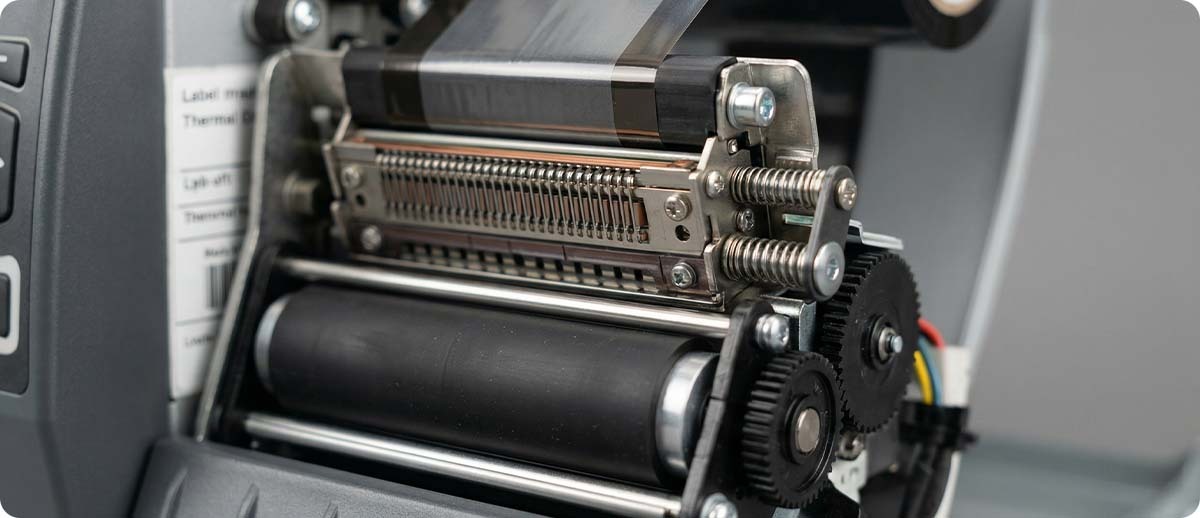
ESA is slower and less dramatic but equally destructive over time. A charged printer surface attracts airborne particulates — dust, paper fiber, ribbon debris, and label adhesive particles — like a magnet. These particles accumulate on the printhead, the platen roller, the media path, and the paper sensor. The result is a layer of insulating contamination that interferes with heat transfer from the printhead to the label, causes uneven pressure on the platen roller, and blocks the paper sensor's optical path.
The 8 Symptoms of Static Electricity Problems in Thermal Printers
Static-related problems are notoriously difficult to diagnose because they mimic so many other failure modes. Here are the eight most common symptoms and what's actually happening inside the printer when you see them:
1. Random Freezes or Mid-Print Lockups
What you see: The printer stops mid-job with no error code, or freezes and requires a power cycle to recover. The problem happens unpredictably — sometimes in the same spot in a print job, sometimes at random.
What's happening: An ESD event has corrupted the contents of the printer's working memory or reset a processor register mid-operation. The firmware loses its place in the print job and hangs. Power cycling clears the corrupted state, which is why the printer "works fine" after a restart — until the next discharge event.
2. Communication Errors and Port Resets
What you see: The printer drops its USB, Ethernet, or serial connection. The host computer reports a communication error or the printer disappears from the network. Reconnecting or rebooting temporarily restores connectivity.
What's happening: ESD traveling through the communication port has forced a reset of the port controller chip. USB and serial ports are among the most ESD-vulnerable paths into a printer because they're externally accessible and directly connected to board-level electronics.
3. Horizontal White Lines Across the Label
What you see: Thin white horizontal streaks appear in the printed image, often in the same position across multiple labels.
What's happening: Debris attracted by static has built up on specific heating elements of the printhead. The insulating layer of dust or ribbon residue prevents heat transfer at that point. This is ESA contamination, not an ESD event — the printhead elements are physically intact, just covered. A thorough printhead cleaning with IPA wipes will often resolve this entirely.
4. Faded or Inconsistent Print Darkness
What you see: Labels print lighter than usual, or print darkness varies unpredictably across the label width.
What's happening: A uniform film of static-attracted contamination across the printhead acts as an insulating layer that reduces overall heat transfer. The printer may compensate by increasing darkness settings, which accelerates printhead wear. Cleaning removes the film and restores normal heat transfer.
5. Labels Feeding Irregularly or Jamming
What you see: Labels skew, double-feed, wrinkle in the media path, or jam in the printer despite using the same labels that previously ran without issue.
What's happening: The label media itself has become electrostatically charged, causing it to attract to surfaces in the media path instead of feeding smoothly. Charged labels can also stick to the platen roller or the tear bar. Additionally, static-attracted debris on the platen roller creates uneven pressure that disrupts smooth media feeding.
6. Paper Sensor Errors (Out of Stock / Paper Out)
What you see: The printer reports "media out" or "paper out" even though a full roll of labels is loaded and seated correctly.
What's happening: The optical paper sensor — a small infrared LED and detector pair that senses label gaps or black marks — has accumulated a layer of static-attracted dust on its lens. The dusty lens scatters or blocks the infrared beam, causing false "no media" readings. Cleaning the sensor lens with an IPA-saturated wipe is usually an instant fix.
7. Corrupted or Partial Print Jobs
What you see: Labels print with garbled characters, missing elements, or text fields that shift position from job to job. The template in your label software looks correct but the printed output doesn't match.
What's happening: An ESD event during data transmission has corrupted the print job data in the printer's receive buffer. The printer prints whatever corrupted data it received. This can also manifest as the wrong label format printing — the ESD knocked the printer into a different format stored in its memory.
8. Premature Printhead Failure
What you see: Printhead life is significantly shorter than expected — permanent white lines appearing after a fraction of the label inches the head is rated for.
What's happening: Repeated ESD events gradually degrade printhead heating elements even when they don't cause immediate failure. The cumulative damage resembles normal wear but appears far too early in the printhead's life. Additionally, when contamination forces the printer to run at higher darkness settings to compensate for reduced heat transfer, the thermal stress on the elements is higher than designed, accelerating end-of-life.
The Static Elimination Checklist: A Step-by-Step Fix
Work through these steps in order. Most static problems in warehouse printers are resolved by steps 1 through 3. Steps 4 and 5 are for chronic or severe cases.
Step 1 — Clean the Printer Thoroughly
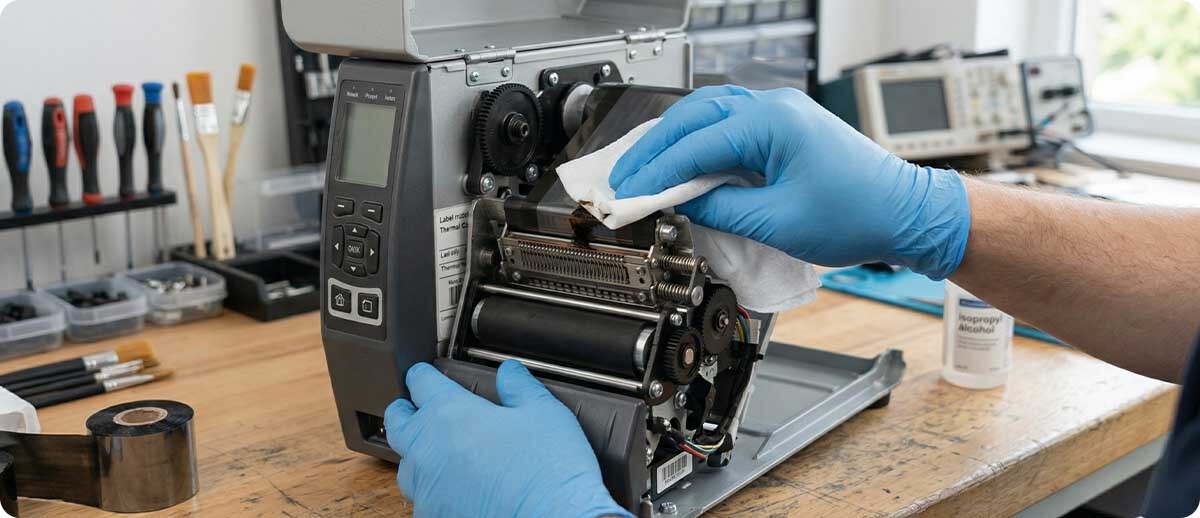
Start here before doing anything else. Static-attracted contamination is the most common cause of the symptoms described above, and cleaning removes it immediately. Power down the printer and open the print mechanism. Clean the printhead, platen roller, media path, and paper sensor using IPA-saturated cleaning wipes or a printhead cleaning pen. Allow full evaporation before closing and restarting.
The IPA (isopropyl alcohol) in cleaning products serves double duty here — it dissolves adhesive residue and ribbon debris, and the act of wiping physically removes the static-attracted particulate layer. After cleaning, many "static problems" resolve entirely.
Step 2 — Verify the Printer is Properly Grounded
A properly grounded printer has a safe discharge path for static charges. Check that the printer's power cable is connected to a properly grounded three-prong outlet. Do not use two-prong adapters. If the printer is on a metal stand or table, ensure the stand is also grounded. Verify the outlet's ground connection with an inexpensive outlet tester — ungrounded outlets in older warehouses are more common than most people expect.
Step 3 — Address Ambient Humidity
Static electricity dissipates naturally in humid air because water molecules on surfaces provide a conductive path for charge to bleed off. The sweet spot for static control in a printer environment is 45–55% relative humidity. Below 30% — common in heated winter warehouses or heavily air-conditioned summer facilities — static problems become significantly worse. A simple portable humidifier near the printer installation, or a building-level humidification system, can dramatically reduce ESD events without any other intervention.
Step 4 — Add an Anti-Static Mat Under the Printer
Anti-static (ESD-dissipative) mats placed under the printer provide a controlled bleed path for charges that build up on the work surface. They're particularly effective when workers frequently touch the printer or load media, as the mat dissipates charge from the contact area before it can reach the printer's electronics. Ensure the mat itself is properly grounded per manufacturer instructions — an ungrounded anti-static mat is functionally useless.
Step 5 — Evaluate Your Label Media
Not all label substrates generate the same level of static. Synthetic label materials — polypropylene, polyester, and polyethylene facestocks — are generally more electrostatically active than paper labels. If you're running synthetic labels in a high-static environment and experiencing chronic problems, consult with your label supplier about anti-static treated label options. Similarly, low-quality label liners are known to generate more static during peeling than higher-quality alternatives.
Cleaning Products for Static-Related Printer Maintenance
Regular cleaning is the single most effective thing you can do to combat static-related printer problems. It removes the accumulated contamination that static brings in, prevents sensor and printhead degradation, and keeps your printer running at spec. Thermal Printer Supplies carries the full range of cleaning supplies for every major brand:
For Zebra Printers
Zebra Printhead Cleaning Pens (Box of 12)
Part #: 105950-035
IPA-saturated cleaning pens designed specifically for Zebra thermal printheads. The precision tip allows targeted cleaning of individual heating element zones without over-saturating the printhead assembly. Ideal for quick between-roll cleanings that prevent static-attracted debris from accumulating. Box of 12.
Shop Zebra Cleaning Pens →Zebra Printhead Cleaning Cards
Part #: 105950-047
Pre-saturated IPA cleaning cards that run through the printer like a label, cleaning the printhead, platen roller, and media path in a single pass. Particularly effective at removing the ribbon residue and adhesive buildup that static attracts. Compatible with all standard Zebra label and receipt printers.
Shop Zebra Cleaning Cards →EZ Wipes IPA Cleaning Wipes (100 Count)
Part #: K2-WIT100
Pre-saturated IPA cleaning wipes for all-around printer cleaning — printhead, platen roller, media path, paper sensors, and exterior surfaces. Particularly effective at wiping away the fine particulate layer that static attracts onto printer surfaces. Compatible with all major printer brands. Use with every roll change in high-static environments.
Shop EZ Wipes Cleaning Wipes →For Honeywell Printers
Honeywell H-Class, I-Class, M-Class Printhead Cleaning Card
Part #: IQ-4X6
Pre-saturated 4" x 6" cleaning card designed for Honeywell H-Class, I-Class, and M-Class industrial printers. Cleans the printhead, platen roller, and media path in one pass. Removes the adhesive residue and particulate contamination that static-charged environments deposit on printer internals. Use with every ribbon and label roll change.
Shop Honeywell Cleaning Cards →For Brady Printers
Brady Pre-Saturated Printhead Cleaning Swabs
Part #: PCK-6
Pre-saturated IPA cleaning swabs designed for Brady thermal transfer printers. The swab format allows precise cleaning of the printhead element line and hard-to-reach areas of the media path where static-attracted debris accumulates. Use regularly in static-prone environments to maintain print quality and extend printhead life.
Shop Brady Cleaning Swabs →Static Electricity vs. Other Causes: How to Tell the Difference
Because static symptoms mimic so many other failure modes, it helps to know the differentiating signs before you spend money on unnecessary repairs or replacement parts:
| Symptom | Likely Static | Likely Other Cause |
|---|---|---|
| Freezes resolve after power cycle | ✓ Static likely | Firmware bug if persistent |
| White lines fixed by cleaning | ✓ Static contamination | Burned elements if cleaning fails |
| Problems worse in winter / dry weather | ✓ Strong static indicator | Hardware failure (not seasonal) |
| Communication drops when worker nearby | ✓ Human-body ESD | Network/cable issue if random |
| False "paper out" on full roll | ✓ Dirty sensor (static) | Wrong label type / gap setting |
| Printhead fails well before rated life | ✓ ESD cumulative damage | High darkness / abrasive media |
| Labels skewing or jamming | ✓ Charged media attraction | Improper media guides |

Frequently Asked Questions: Static Electricity and Thermal Printers
Can static electricity permanently damage my thermal printer?
Yes. A significant ESD event can permanently damage microelectronics on the main board, communication ports, or printhead heating elements. However, the majority of static-related problems in warehouse printers are not permanent — they're contamination issues or temporary disruptions that cleaning and grounding improvements resolve completely.
My printer only has problems in winter. Is that definitely static?
Winter is the strongest environmental indicator for static as a root cause. Heated buildings dramatically reduce indoor relative humidity, which is the primary natural dissipator of electrostatic charge. If your problems disappear in summer and return every winter, improving humidity near the printer location — even a small portable humidifier — will likely solve it.
How often should I clean my printer in a high-static warehouse environment?
In standard environments, the rule of thumb is every 1–2 rolls of media. In high-static warehouse environments — particularly those running synthetic labels, using heated or heavily air-conditioned air, or situated near forklift traffic — clean with every roll change and perform a full wipe-down at the start of each shift.
Does the type of label I use affect static buildup?
Yes, significantly. Synthetic label materials — polypropylene, polyester, polyethylene — are much more electrostatically active than paper labels. If you've switched from paper to synthetic labels and started experiencing static problems, the media change is almost certainly a contributing factor. Anti-static treated synthetic labels are available for high-static environments.
Will using a surge protector protect my printer from static damage?
A surge protector guards against voltage spikes on the power line but provides no protection against ESD events entering through other paths — the communication ports, the media path, or the printer chassis. Proper grounding of the printer and work surface, combined with humidity control and regular cleaning, is more effective than power-line protection alone.
My printer freezes but only when a specific worker uses it. What's going on?
This is a classic sign of human-body ESD. That worker is building up a higher charge than others — likely due to their footwear type (rubber-soled shoes on synthetic flooring are particularly effective charge generators) or their movement patterns. Having them touch a grounded metal surface before touching the printer, or placing an ESD-dissipative mat at their work position, will typically resolve it immediately.