
How to Clean Your Zebra Printhead and Platen Roller
Posted by Thermal Printer Supplies on Sep 16th 2025
Your Zebra thermal printer is a reliable workhorse—printing shipping labels, barcodes, inventory tags, and product labels day in and day out. But like any hardworking machine, it needs regular care to keep running at peak performance. One of the most important (and easiest) maintenance steps is cleaning your Zebra printhead and platen roller.
Skipping this simple routine can lead to poor print quality, wasted supplies, downtime, and even premature failure of your printhead—the most expensive consumable part in your printer. The good news? Cleaning takes less than a minute, and the payoff is huge.
Why a Dirty Printhead Costs You Big
Over time, dust, dirt, ribbon residue, and label adhesive build up on your printhead. While it may not look like much, this debris acts as an insulator, preventing the heating elements from working properly.
-
Poor Print Quality & Barcode Errors
You’ll start noticing streaks, white lines, or faded text on your labels. Barcodes may scan inconsistently—or fail to scan at all. That means mis-shipped packages, inventory errors, and frustrated teams. -
Shorter Printhead Lifespan
A clean printhead can last a long time. But when dirt builds up, the printer compensates by applying more heat (darkness), putting stress on the elements. That extra strain causes premature burnout, turning an expensive part into a frequent replacement.
Keeping the printhead clean is the single most effective way to extend its life and protect your investment.
Don’t Forget the Platen Roller
The platen roller—the black rubber roller under the printhead—is just as important. When it collects adhesive and dust, it loses grip. That leads to:
-
Label skipping or blank labels
-
Misaligned or drifting print
-
Material jams and downtime
By cleaning the platen roller regularly, you keep the media path smooth and ensure consistent label feeding.
The Best Cleaning Method: Isopropyl Alcohol Wipes
The easiest and safest way to clean a Zebra printhead and platen roller is with isopropyl alcohol (IPA) wipes.
Why IPA?
-
Dissolves adhesive, ink, and oil buildup quickly
-
Evaporates completely—no residue left behind
-
Gentle enough for sensitive printhead elements
⚠️ Never use water, rough cloths, or sharp tools. These can permanently damage your printer.
Quick Zebra Printer Cleaning Routine
Make cleaning part of your regular workflow. A good rule of thumb is: clean every 1–2 rolls of labels or ribbons.
-
Power Down – Turn off your printer and open the printhead assembly.
-
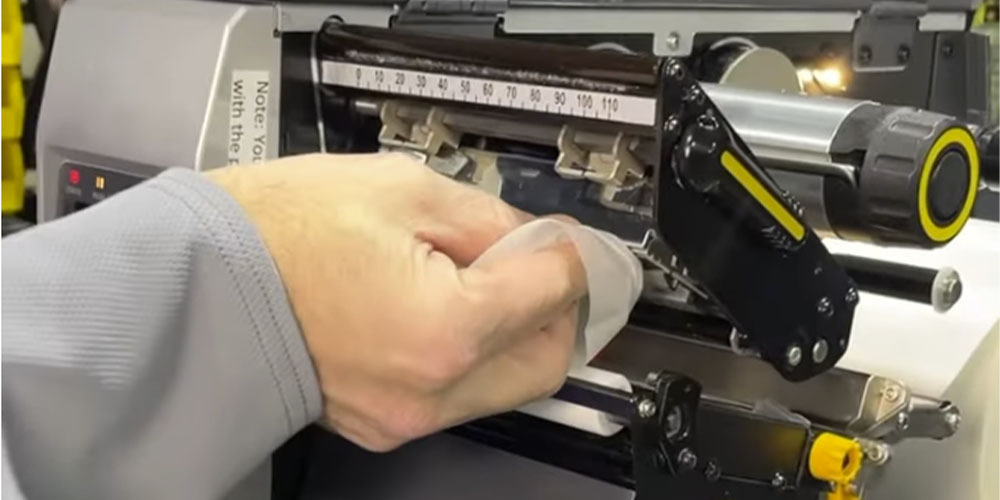
Wipe the Printhead – Using an IPA cleaning wipe, gently clean the thin gray line of the printhead from end to end.
-
Clean the Platen Roller – Rotate the roller as you wipe it thoroughly with the same type of cleaning wipe.
-
Dry & Restart – Allow a minute for the alcohol to evaporate, then close the printer and power it back on.
That’s it! In less than 60 seconds, you’ll protect your print quality, extend printhead life, and keep your Zebra printer running smoothly.
Stock Up on Cleaning Supplies
At Thermal Printer Supplies, we carry a full line of Zebra-approved cleaning wipes, printheads, ribbons, and labels. Keeping the right cleaning supplies on hand makes it easy to add this quick step to your workflow and avoid costly downtime.
? Shop Zebra Cleaning Supplies Now >>>
Watch Video:
Talk to an Expert